
Designing an AI-Assisted Dashboard for Enterprise Network Operations
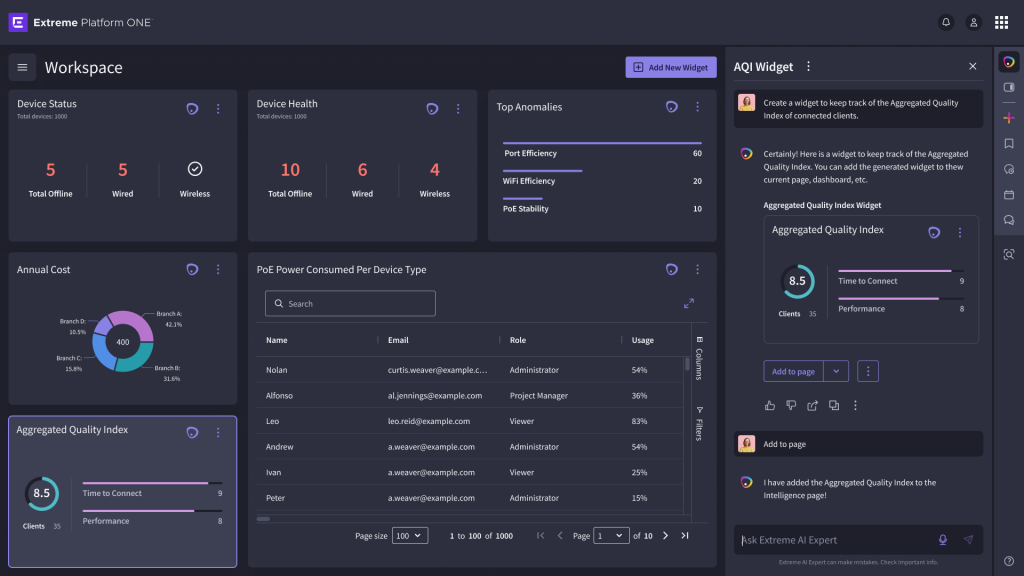
An AI-assisted dashboard within Extreme Platform ONE that combines at-a-glance network monitoring with customizable widgets created through natural language.
Product
Extreme Platform One
Role
Sr. Product Designer
Contribution
AI Interaction Design & Dashboard Customization
Timeline
6 months
Platform
Web/ Desktop
The Challenge
A single dashboard can’t easily meet every administrator’s monitoring needs while keeping essential network information visible at a glance.
My Focus
I designed AI-assisted dashboard interactions and partnered with Product Management to shift the experience toward users’ monitoring needs while preserving AI-driven customization.
Overview
Extreme Platform ONE was being designed as a unified platform for managing and monitoring complex enterprise networks. As part of that vision, the team explored how AI could help administrators create personalized workspaces, surface relevant information, and take action more efficiently.
My Role
As the Senior Product Designer on this work, I helped shape how AI could become part of a practical, persistent monitoring experience rather than remain isolated within a conversational interface.
My contributions included designing AI-generated widget cards for the workspace and exploring how users could move content from AI Expert onto the main canvas. I designed interactions for adding, editing, arranging, and reordering widgets, while also defining different behaviors for Extreme-generated and customer-generated content. I explored edit states between the AI panel and dashboard canvas, evaluated the broader landing experience to identify usability gaps, and contributed to the evolution from an AI-first workspace toward a monitoring-first dashboard supported by AI. Throughout the concept and evaluation process, I collaborated with product managers, designers, engineers, and AI-focused product teams.
The Challenge
The original experience centered heavily on an AI-driven workspace.
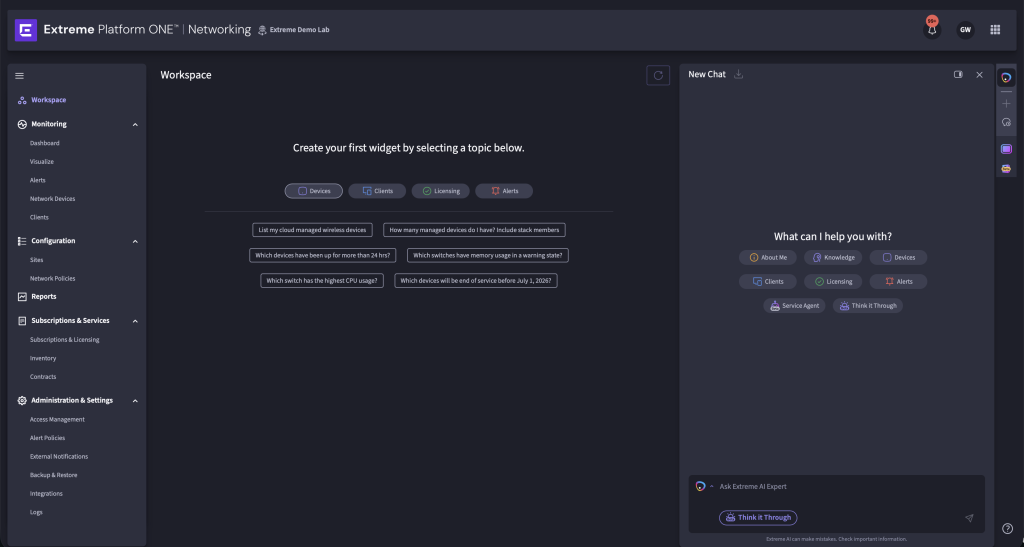
Users could interact with AI Expert and create workspace content, but the primary landing experience provided limited information before users initiated those interactions.
For network administrators who regularly need to monitor network health, alerts, devices, and operational changes, this raised a larger product question:
How might we make AI useful without requiring users to start from an empty workspace every time they enter the product?
The challenge became balancing two needs:
AI-driven exploration and customization with immediate visibility into critical network information.
Design Process
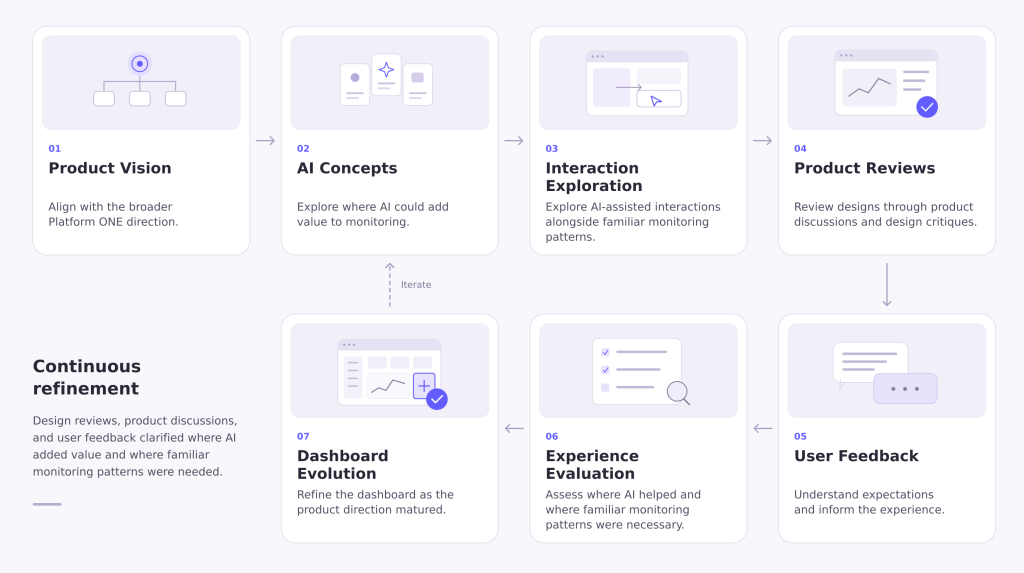
The project evolved continuously as the broader Platform ONE vision matured.
Rather than treating the AI concept as fixed, we used design reviews, product discussions, and user feedback to understand where AI added value and where more familiar monitoring patterns were still necessary.
Core Design Decisions
01. Turning AI Responses Into Persistent Tools
AI Expert could help users retrieve information, but conversational responses are temporary.
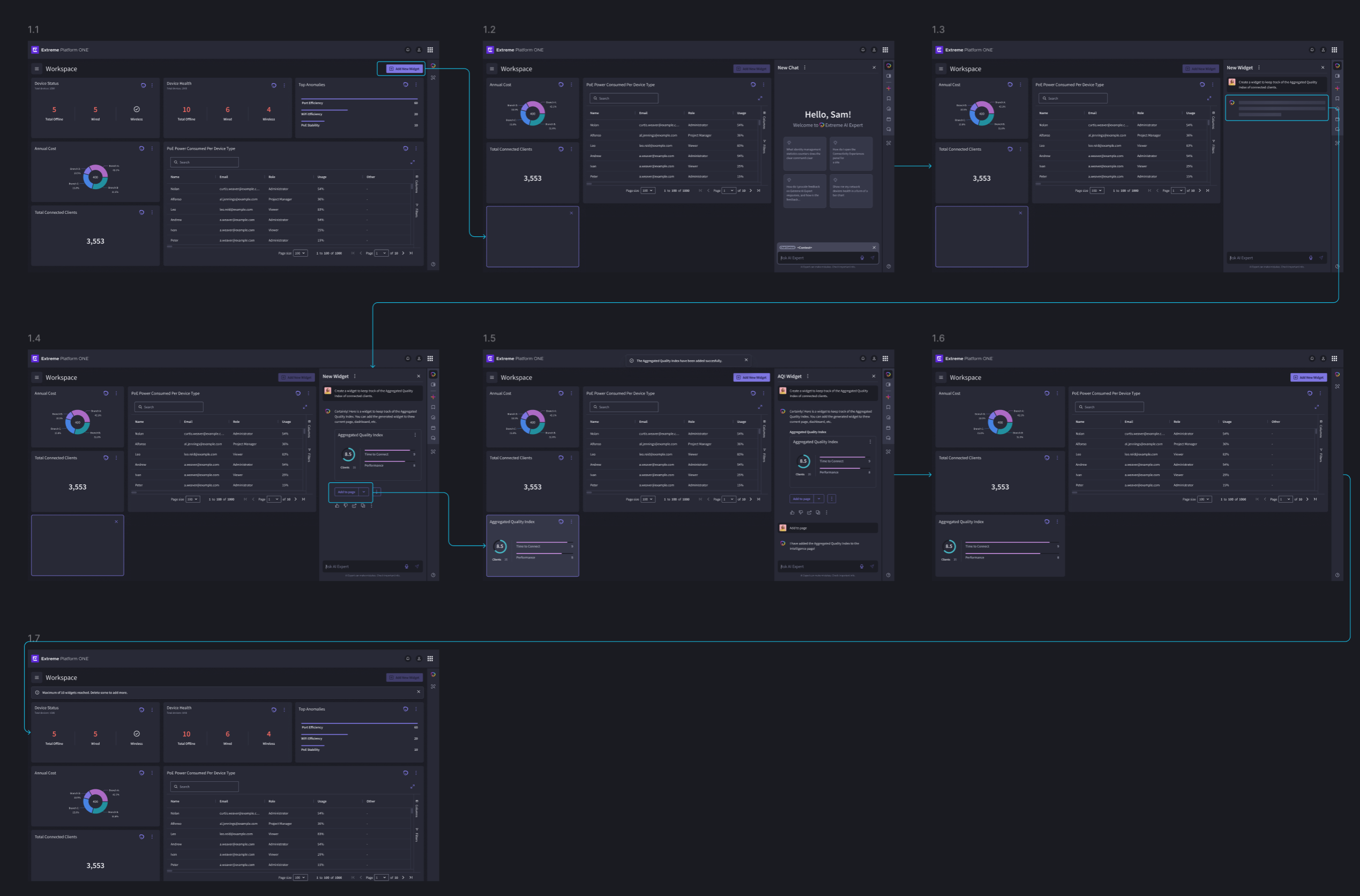
For information that administrators need to reference repeatedly, I explored turning AI-generated results into persistent widgets that could live directly on the workspace.
This shifted AI from simply answering questions to helping users construct an operational environment around the information most relevant to them.
How might we make AI-generated information useful beyond the conversation?
Design Approach
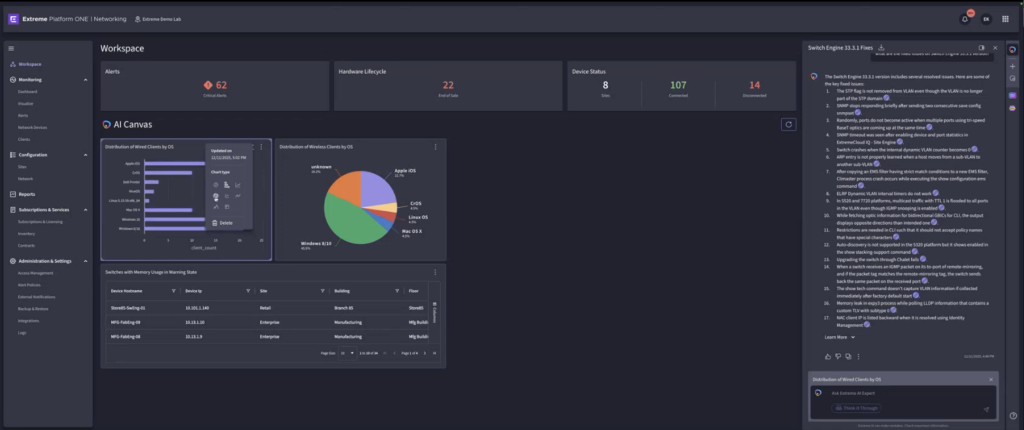
Users could interact with AI Expert, generate relevant information, and add selected content to their workspace as a widget.
Once placed on the canvas, widgets became part of the persistent dashboard rather than disappearing with the conversation.
02. Making the Workspace Flexible Without Making It Difficult to Manage
As users added more AI-generated content, the workspace needed to support personalization without becoming chaotic.
How might we give users control over their dashboard while keeping customization understandable?
I explored interactions that allowed widgets to be added, reordered, edited, and removed.
Drag-and-drop interactions allowed administrators to reorganize information based on their priorities, while edit affordances made customization discoverable without overwhelming the default experience.
An important part of the work was distinguishing between editing the workspace itself and modifying content through the AI Expert panel.
These two contexts needed clear behaviors so users understood whether they were manipulating dashboard layout or changing the information represented by a widget.
03. Defining System-Generated and User-Generated Content
Not every dashboard element originated in the same way.
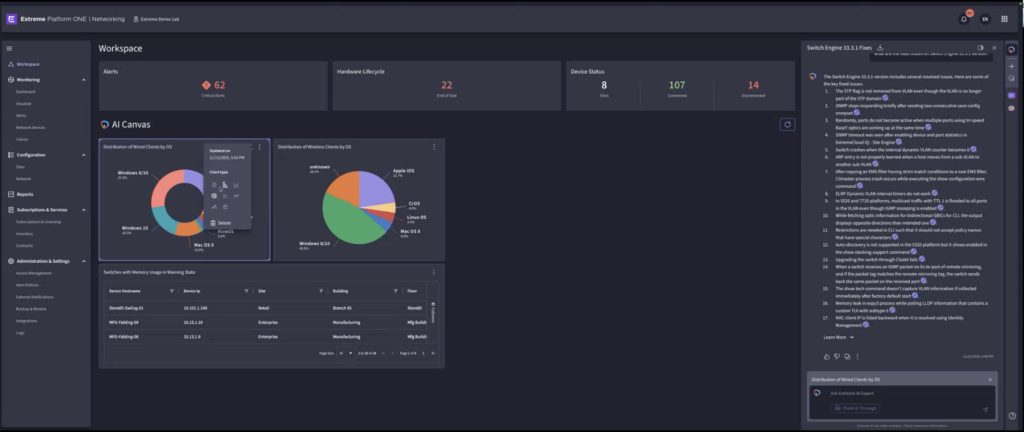
Some content could be recommended or generated by Extreme, while other widgets could originate directly from a customer’s interaction with AI Expert.
How might we combine recommended information with user-created content without losing clarity?
I explored how the system could distinguish these sources while maintaining a cohesive dashboard.
This was important because administrators needed to understand which information was part of the product’s default monitoring experience and which elements represented their own customized workspace.
The emerging model created room for both:
System-provided monitoring widgets
and
AI-generated personalized widgets
within the same experience.
04. A Shift in the Product Direction
What We Learned
- As the experience evolved, feedback revealed a fundamental problem with the initial concept.
- Users did not necessarily want to arrive at an almost empty workspace and decide what to ask AI before seeing useful information.
- For network administrators, monitoring is already a core part of their workflow.
- They expected important network information to be available immediately.
This reframed the product question from:
“How can AI help users build their workspace?” to: “How can the product provide immediate operational value while AI enhances and personalizes the experience?”
That distinction significantly influenced the next iteration.
05. Moving From an AI-First Workspace to a Monitoring-First Dashboard
How might we deliver immediate value while preserving the flexibility of AI?
Based on the feedback, I explored a redesigned landing experience centered around a default monitoring dashboard.
Instead of requiring administrators to construct their experience from scratch, the dashboard could provide useful information immediately, such as network status, devices, alerts, and other monitoring signals.
AI Expert remained valuable, but its role shifted.
Rather than being the experience users had to begin with, AI could help them investigate, personalize, generate new insights, and extend the dashboard.
This created a stronger relationship between traditional monitoring and emerging AI capabilities
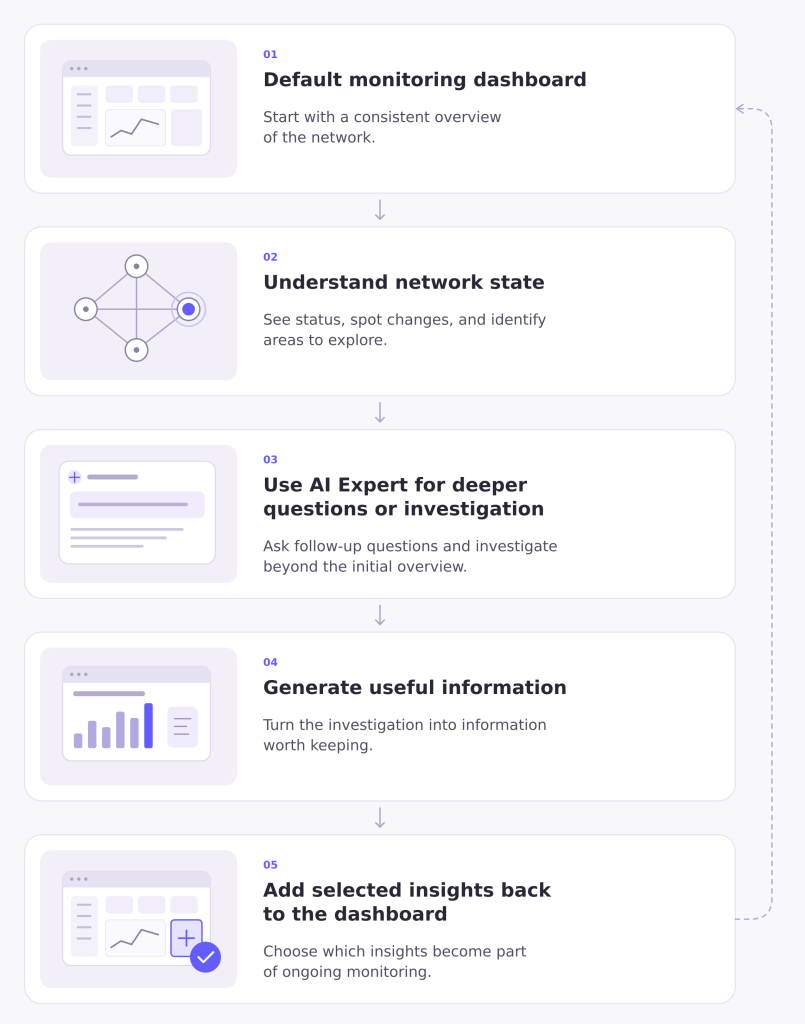
Emerging Experience Model
Outcome
The project helped evolve the landing-page concept from a primarily AI-driven workspace toward a more balanced model combining immediate monitoring information, personalization, and AI-assisted exploration.
My work helped define interaction patterns for:
AI-generated widgets → persistent dashboard content → customization → continued AI investigation
As the broader AI initiative continued evolving, portions of the AI experience transitioned to another designer while I returned to Design System work. I later explored dashboard concepts that reflected the monitoring needs identified through user feedback and product evaluation.
The work demonstrated an important lesson for designing AI products:
AI does not always need to replace familiar workflows. Sometimes its greatest value comes from strengthening them.
Reflection
Design AI around the user’s job, not around the technology
The original concept emphasized what AI could generate. Feedback shifted the focus toward what administrators actually needed when entering the platform.
Provide value before requiring input
A useful default dashboard reduced the burden on users to decide what to ask before the product became useful.
Let AI extend familiar workflows
AI Expert became more powerful when connected to established monitoring behaviors rather than functioning as an isolated experience.
Design for persistence
Turning AI-generated information into reusable widgets helped bridge conversational AI and ongoing operational workflows.